Table of Contents
- Payment Options Overview
- Online and Mobile Payments
- Step‑by‑Step Online Payment Process
- Tips for a Smooth Digital Payment
- Phone and Mail Payments
- Phone Payment Procedure
- Best Practices for Phone and Mail Payments
- Automatic Payments (AutoPay)
- Setting Up AutoPay
- Considerations When Using AutoPay
- Timing, Posting, and Late Fees
- Troubleshooting Common Issues
- Payment Not Showing on Your Account
- Duplicate Payments
- Declined Payments
- Chip Damage and Card Functionality
- Security and Fraud Prevention
- Secure Your Payment Credentials
- Use Virtual Credit Card Numbers for Online Shopping
- Monitor Account Activity
Comenity Bank credit card payment processes can feel like a maze, especially for cardholders who juggle multiple accounts and billing cycles. Understanding the available channels, timing rules, and common obstacles helps you stay on top of your obligations while protecting your credit score. This article walks you through every payment method offered by Comenity Bank, highlights best‑practice tips, and points out where many users get stuck.
Whether you prefer the convenience of a mobile app, the reliability of a phone call, or the familiarity of mailing a check, each option follows a specific set of steps that, when followed correctly, guarantee a smooth transaction. By the end of this guide, you’ll know exactly how to make a payment, what to watch for, and how to resolve issues without a lengthy wait on customer‑service hold.
Below, we break down the payment ecosystem into clear sections, using real‑world scenarios and practical advice to keep your experience straightforward and stress‑free.
Payment Options Overview
Comenity Bank provides several avenues for cardholders to settle their balances:
- Online banking portal
- Mobile app (iOS and Android)
- Automated phone system (IVR) and live representative
- Mail‑in checks or money orders
- Third‑party payment services (e.g., PayPal, bill‑pay through your own bank)
Choosing the right channel depends on your personal routine, the speed you need, and whether you want a paper trail. Most users find the online portal and mobile app to be the quickest, but phone and mail payments remain valuable for those who prefer a human touch or lack reliable internet access.
Online and Mobile Payments

For the majority of cardholders, the digital route is the fastest and most secure. Follow these steps to complete a payment online or through the Comenity Bank mobile app:
Step‑by‑Step Online Payment Process
- Log in to your account at ComenityBank.com using your username and password.
- Navigate to the “Payments” or “Make a Payment” tab.
- Select the payment source (checking account, savings account, or another credit card).
- Enter the amount you wish to pay. You can choose the minimum payment, the full balance, or a custom amount.
- Confirm the transaction details, then click “Submit.” A confirmation screen will display a transaction reference number.
Mobile app users follow the same workflow, with the added benefit of biometric authentication (fingerprint or facial recognition). The app also sends push notifications once the payment is processed, giving you instant confirmation.
When you’re checking your balance after a payment, the article How to Instantly Check Your Credit Card Available Balance and Boost Financial Confidence offers a quick guide to seeing the updated figure in real time.
Tips for a Smooth Digital Payment
- Verify that the linked bank account has sufficient funds before confirming the payment.
- Set up alerts for upcoming due dates to avoid accidental late fees.
- Use a secure network—avoid public Wi‑Fi when entering banking credentials.
- Keep your mobile app updated to benefit from the latest security patches.
Phone and Mail Payments
Even in a digital age, many cardholders still rely on traditional methods. Comenity Bank’s phone system allows you to make a payment using an automated voice response or by speaking directly with a representative.
Phone Payment Procedure
- Dial the customer‑service number printed on the back of your card.
- Select the option for “Make a Payment.”
- Enter your account number and the payment amount using the keypad, or wait for a live agent.
- Provide the routing and account numbers of the bank from which you’re drawing funds.
- Listen for the confirmation code and note it for your records.
If you prefer to mail a payment, write a check or money order payable to “Comenity Bank.” Include your account number on the memo line, place the payment in the envelope, and send it to the address listed on your statement. Allow at least 5‑7 business days for processing; otherwise, you risk a late fee.
Best Practices for Phone and Mail Payments
- When paying by phone, have your bank routing and account numbers handy to avoid delays.
- For mailed payments, use certified mail or a tracking service to confirm delivery.
- Always write the correct account number in the memo line; a missing or incorrect number can cause the payment to be misapplied.
- Retain a copy of the check or a screenshot of the confirmation page for future reference.
Automatic Payments (AutoPay)
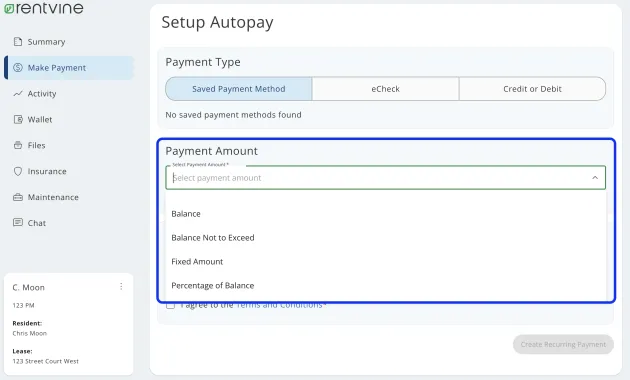
AutoPay eliminates the need for manual intervention each month. You can schedule recurring payments through the online portal, mobile app, or by calling customer service.
Setting Up AutoPay
- Log in to your account and go to the “AutoPay” section.
- Choose the source account and the payment amount (minimum, full balance, or a custom figure).
- Select the payment date—typically a few days before the statement due date.
- Confirm the schedule and save.
AutoPay offers two main benefits: it helps you avoid late fees, and it contributes positively to your payment history, a key factor in credit scoring models.
Considerations When Using AutoPay
- Ensure the linked bank account never falls below the required balance; an overdraft could trigger a returned‑payment fee.
- Review your statements each month to verify that the correct amount was charged, especially if you have variable spending.
- If you anticipate a large purchase, temporarily suspend AutoPay or adjust the payment amount to avoid exceeding your preferred limit.
Timing, Posting, and Late Fees
Understanding the timeline from payment initiation to posting helps you avoid accidental late fees. Here’s a typical flow:
- Electronic payments (online, mobile, phone): Usually post within 1‑2 business days. Some payments are marked “pending” on the day of submission and become “posted” the next day.
- Mail payments: Require 5‑7 business days for delivery plus 1‑2 days for posting, totaling roughly 7‑9 days.
- Third‑party bill‑pay services: Follow the schedule set by the service provider; verify their cut‑off times.
If a payment is posted after the due date, Comenity Bank may assess a late fee, typically $25‑$35, and may report the delinquency to credit bureaus. To stay safe, always make payments at least two days before the due date when using electronic channels, and three to five days earlier for mailed checks.
Troubleshooting Common Issues

Even with careful planning, problems can arise. Below are frequent scenarios and how to address them.
Payment Not Showing on Your Account
- Check the “Pending Transactions” section; the payment may still be processing.
- Verify the transaction reference number from your confirmation email or receipt.
- If the payment was made via a third‑party service, contact that service to confirm the transfer.
- Should the amount remain missing after 48 hours, call Comenity Bank’s support line with your reference number.
Duplicate Payments
Accidental double payments can happen when a user submits a payment both online and by phone. Comenity Bank typically applies the extra amount as a credit to your account, which you can use for future purchases. If you prefer a refund, request it in writing within 30 days.
Declined Payments
Reasons for a decline include insufficient funds, mismatched account numbers, or a frozen bank account due to suspected fraud. In such cases:
- Check your bank balance and ensure the routing/account numbers are correct.
- Contact your bank to lift any holds.
- Retry the payment after resolving the issue.
If the decline persists, reach out to Comenity Bank’s fraud department; they may need to verify your identity before allowing the transaction.
Chip Damage and Card Functionality
Physical damage to the EMV chip can prevent a card from being read, affecting in‑store purchases and certain online verification steps. For a deeper look at chip‑related problems, see Understanding the Chip Damage Issue. If your card’s chip is compromised, request a replacement through the online portal or by calling customer service.
Security and Fraud Prevention

Protecting your payment information is paramount. Comenity Bank employs encryption, tokenization, and real‑time fraud monitoring. Nonetheless, cardholders should adopt best practices:
Secure Your Payment Credentials
- Never share your password or PIN with anyone, even if they claim to be from “the bank.”
- Enable two‑factor authentication (2FA) on the online portal and mobile app.
- Regularly update your password with a mix of letters, numbers, and symbols.
Use Virtual Credit Card Numbers for Online Shopping
Virtual numbers generate a temporary card number linked to your actual account, reducing exposure of your real card details. Learn more about how these work in the guide How Virtual Credit Card Numbers Work. When a merchant supports virtual numbers, you can create a one‑time use number for each transaction, limiting the risk of data breaches.
Monitor Account Activity
Set up transaction alerts via email or SMS. Review statements weekly to spot unauthorized charges early. If you notice anything suspicious, report it immediately through the “Secure Message” feature or by calling the fraud line.
By combining the bank’s security infrastructure with personal vigilance, you can keep your payment experience safe and uninterrupted.
In summary, mastering Comenity Bank credit card payment involves selecting the channel that aligns with your lifestyle, adhering to timing guidelines, and staying proactive about potential issues. Whether you automate payments, rely on the mobile app, or prefer mailing a check, the key is consistency and awareness. With the strategies outlined here, you can avoid late fees, protect your credit standing, and maintain confidence in your financial routine.