Table of Contents
- Online Portal: First‑Time Login and Account Setup
- Step‑by‑Step Registration
- Enabling Two‑Factor Authentication (2FA)
- Common Login Problems and Solutions
- Mobile Access: Using the Merrick Bank App
- Downloading and Installing the App
- Key Features at Your Fingertips
- Security Tips for Mobile Users
- Phone and In‑Person Options
- Calling Customer Service
- Visiting a Branch or Partner Location
- Managing Payments and Statements
- Automated Payments (AutoPay)
- One‑Time Payments
- Accessing Statements
- Reward Programs and Benefits
- Tracking Your Rewards
- Redeeming for Travel or Statement Credits
- Additional Perks
- Troubleshooting Common Access Issues
- Issue: “Your Account Could Not Be Found”
- Issue: “Session Timed Out”
- Issue: Unexpected Fees on Your Statement
- Security Best Practices for Ongoing Account Safety
- Regularly Review Transaction History
- Update Passwords Periodically
- Consider Freezing Your Card When Not in Use
- Monitor Credit Reports Annually
For many cardholders, the ability to view balances, make payments, and track rewards hinges on a seamless connection to their credit card account. Merrick Bank credit card account access is designed to be straightforward, yet new users often encounter questions about where to begin, what security measures are in‑to‑play, and how to resolve common hiccups. Understanding the full suite of access options can turn a potentially confusing experience into a routine part of managing personal finances.
In this article we walk through every step of the process, from registering for online banking to navigating the mobile app, while highlighting security best practices and troubleshooting tips that keep your account safe. By the end, you’ll have a clear roadmap for staying on top of your Merrick Bank credit card—no matter where you are.
Online Portal: First‑Time Login and Account Setup
Most Merrick Bank credit card holders start their digital journey through the bank’s secure online portal. The portal offers a full view of transaction history, payment options, and reward balances, all accessible from a web browser.
Step‑by‑Step Registration
- Gather Your Card Details: Have your 16‑digit card number, expiration date, and the three‑digit CVV handy. These identifiers verify that you are the legitimate cardholder.
- Visit the Official Site: Navigate to Merrick Bank’s homepage and click the “Sign In / Register” button located at the top right corner.
- Create a Username and Password: Choose a username that is easy to remember but not personally identifying. For the password, combine uppercase, lowercase, numbers, and symbols to meet the minimum eight‑character requirement.
- Set Up Security Questions: Answer three security questions. These will be used later for identity verification if you ever need to reset your password.
- Verify Your Email: Merrick Bank will send a verification link to the email address you provided. Click the link within 24 hours to activate your online account.
Enabling Two‑Factor Authentication (2FA)
Two‑factor authentication adds an extra layer of protection by requiring a one‑time code sent to your mobile device. To enable 2FA, go to the “Security Settings” section after logging in and follow the prompts to register your phone number. Once active, every login attempt will request the code, dramatically reducing the risk of unauthorized access.
Common Login Problems and Solutions
- Forgotten Username or Password: Use the “Forgot Username/Password” link on the login page. After confirming your identity via security questions or a verification code sent to your email, you can reset your credentials.
- Browser Compatibility Issues: The portal works best with the latest versions of Chrome, Firefox, Safari, or Edge. Clear your browser cache and cookies if you encounter loading errors.
- Account Locked After Multiple Failed Attempts: Contact Merrick Bank’s customer service at the phone number listed on the back of your card. After verification, the representative can unlock your account.
Mobile Access: Using the Merrick Bank App
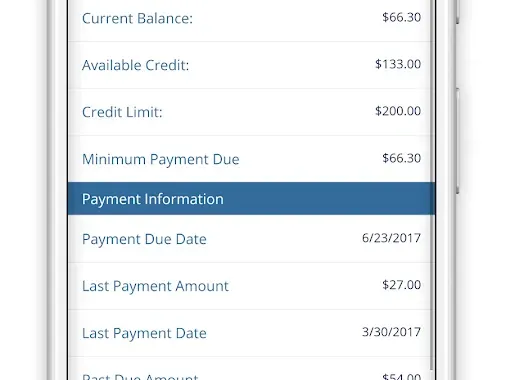
For cardholders who prefer on‑the‑go management, the Merrick Bank mobile app delivers most of the same functionalities as the web portal, optimized for smartphones and tablets.
Downloading and Installing the App
- Visit the Apple App Store or Google Play Store.
- Search for “Merrick Bank Mobile.”
- Tap “Install” and wait for the download to complete.
- Open the app and log in using the same credentials you created for the online portal.
Key Features at Your Fingertips
- Real‑Time Balance Updates: Transaction data syncs within minutes, letting you see purchases as they post.
- Instant Payments: Schedule one‑time or recurring payments directly from the app.
- Reward Tracking: View accrued cash‑back or points and redeem them without leaving the app.
- Push Notifications: Receive alerts for payment due dates, large transactions, or potential fraud.
Security Tips for Mobile Users
Enable biometric authentication (fingerprint or facial recognition) if your device supports it. This not only speeds up login but also ensures that only you can unlock the app.
Phone and In‑Person Options
While digital channels dominate, Merrick Bank still offers traditional ways to access your account. These can be especially useful if you lack internet connectivity or need immediate assistance.
Calling Customer Service
Dial the 24‑hour toll‑free number printed on the back of your card. After verifying your identity using your card number and personal details, the representative can provide balance information, process a payment, or answer account‑related questions. For an example of how a declined transaction might be handled, see our guide on why credit cards get declined.
Visiting a Branch or Partner Location
If you prefer face‑to‑face interaction, Merrick Bank partners with several retail locations where you can make payments or request printed statements. Bring a valid photo ID and your credit card for verification.
Managing Payments and Statements
Timely payments protect your credit score and avoid costly interest charges. Merrick Bank provides several avenues to ensure you stay current.
Automated Payments (AutoPay)
- Log in to your online account or mobile app.
- Select “AutoPay Settings” from the menu.
- Choose a payment amount: minimum payment, full balance, or a custom amount.
- Link a checking account for automatic withdrawals on the due date.
One‑Time Payments
Whether you prefer online banking, the mobile app, or a phone call, one‑time payments are processed within one to two business days. For a deeper look at how direct deposits can boost cash‑back rewards, refer to our article on understanding direct deposit for cash‑back rewards.
Accessing Statements
Monthly statements are available in PDF format through the “Documents” tab of the online portal or app. Download them for tax purposes, expense tracking, or to verify disputed charges.
Reward Programs and Benefits

Many Merrick Bank credit cards come with cash‑back or points‑based reward structures. Knowing how to monitor and redeem these benefits maximizes the card’s value.
Tracking Your Rewards
The “Rewards” section of the portal displays accumulated cash‑back percentages, total points, and redemption options. Rewards typically reset at the end of the calendar year, so stay aware of expiration dates.
Redeeming for Travel or Statement Credits
Some cards allow you to convert points into travel statement credits, potentially saving hundreds on flights or hotels. For a step‑by‑step guide on redeeming points for travel credits, check out unlock free travel.
Additional Perks
- Purchase Protection: Covers eligible items against damage or theft for a limited period.
- Extended Warranty: Adds up to one additional year on manufacturer warranties.
- Travel Insurance: Includes trip cancellation and interruption coverage on certain cards.
Troubleshooting Common Access Issues
Even with clear instructions, users sometimes encounter obstacles. Below are frequent problems and concise remedies.
Issue: “Your Account Could Not Be Found”
This error usually indicates a mismatch between the information entered and the bank’s records. Double‑check that you are using the correct card number and that the card is active. If the problem persists, contact Merrick Bank to confirm that the account is not frozen.
Issue: “Session Timed Out”
For security reasons, the portal logs you out after a period of inactivity. Simply log back in; if the issue recurs, clear your browser cache or try a different browser.
Issue: Unexpected Fees on Your Statement
Review the “Fee Summary” section to identify the source. Late fees, cash‑advance fees, and foreign transaction fees are common. To understand how late fees affect your balance, read our article on understanding late fees and their impact.
Security Best Practices for Ongoing Account Safety
Maintaining vigilance protects both your credit standing and personal information. Adopt these habits as part of your regular financial routine.
Regularly Review Transaction History
Scan your recent activity at least weekly. Promptly report any unfamiliar charges to Merrick Bank’s fraud department.
Update Passwords Periodically
Change your online password every three to six months. Avoid reusing passwords across multiple financial sites.
Consider Freezing Your Card When Not in Use
If you anticipate an extended period without using the card, freezing it can prevent unauthorized transactions. Learn more about the benefits of freezing a credit card in our piece on why freezing a credit card makes sense.
Monitor Credit Reports Annually
Annual credit reports from the three major bureaus can reveal unauthorized accounts or errors. Request your free report at AnnualCreditReport.com.
By integrating these security measures with the robust access tools Merrick Bank provides, you can confidently manage your credit card, stay on top of payments, and enjoy the rewards without unnecessary worry.
Whether you favor the convenience of a mobile app, the comprehensive view of the online portal, or the personal touch of a phone call, Merrick Bank credit card account access is engineered to meet diverse needs. With the steps, tips, and safeguards outlined above, you are well equipped to navigate your account efficiently and securely.