Table of Contents
- Why Apple Pay Compatibility Matters for Credit Card Choice
- Top Credit Cards for Apple Pay Users
- 1. Apple Card – The Native Experience
- 2. Chase Sapphire Preferred® – For Travel‑Savvy Apple Pay Users
- 3. Citi® Double Cash Card – Simple Cash Back with Apple Pay
- 4. American Express® Gold Card – Maximizing Food & Grocery Spend
- 5. Discover it® Cash Back – Rotating Categories Aligned with Apple Pay
- How to Optimize Your Apple Pay Experience with the Right Card
- Set Up Automatic Reward Tracking
- Leverage Apple Pay‑Only Promotions
- Combine Card Benefits with Apple Card Monthly Installments
- Monitor Security Settings Regularly
- Choosing the Right Card for Your Lifestyle
- Practical Steps to Get Started
- 1. Review Your Current Card Portfolio
- 2. Apply for a Card That Complements Your Apple Pay Use
- 3. Add the Card to Apple Wallet
- 4. Activate and Track Bonus Offers
- 5. Monitor Your Statements for Accuracy
- Potential Pitfalls and How to Avoid Them
- Overlooking Tiered Reward Structures
- Ignoring Annual Fees
- Missing Out on Introductory Bonuses
- Failing to Secure the Device
- Future Outlook: Apple Pay and Credit Card Innovation
Apple Pay has reshaped how consumers handle everyday transactions, turning smartphones into secure, tap‑to‑pay devices. For users who rely on this digital wallet, the right credit card can amplify the benefits—whether through higher cash‑back rates on Apple‑related purchases, accelerated reward earnings, or robust fraud protection. This article walks through the most compelling credit cards tailored for Apple Pay enthusiasts, detailing how each card aligns with common spending habits and the Apple ecosystem.
Choosing a credit card for Apple Pay isn’t merely about the brand logo displayed on your iPhone; it’s about the synergy between the card’s reward structure and the way you spend. From frequent iTunes and App Store purchases to everyday groceries and travel, the optimal card can turn routine swipes into tangible savings. Below, we explore cards that excel in these categories, highlight their key features, and provide practical tips for maximizing value while staying secure.
Why Apple Pay Compatibility Matters for Credit Card Choice
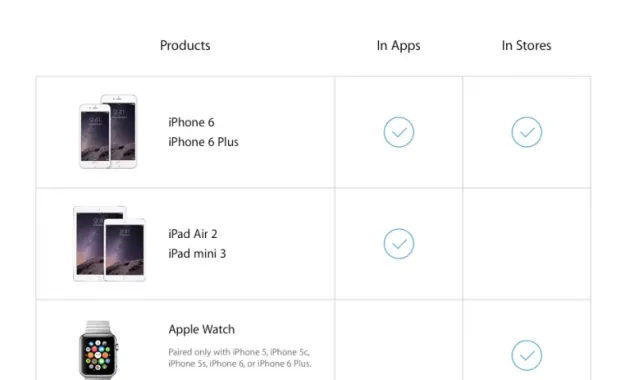
Apple Pay’s tokenization process replaces your actual card number with a unique device‑specific token, reducing exposure to fraud. This added security layer can influence credit‑card selection in several ways:
- Enhanced protection: Cards that already offer strong fraud monitoring become even safer when paired with Apple Pay’s biometric authentication.
- Seamless rewards tracking: Many issuers automatically attribute Apple‑specific purchases to bonus categories, simplifying statement reviews.
- Convenient management: Adding, removing, or freezing cards through the Wallet app streamlines account control, especially for travelers.
Understanding these advantages helps you prioritize cards that not only work with Apple Pay but also leverage its capabilities to boost your financial health.
Top Credit Cards for Apple Pay Users
1. Apple Card – The Native Experience
Designed by Apple in partnership with Goldman Sachs, the Apple Card offers a seamless integration that feels native to iOS devices. Key attributes include:
- Daily cash back: 3% on Apple purchases (including the App Store, Apple Music, and Apple TV+), 2% on any transaction made with Apple Pay, and 1% on physical card usage.
- Transparent fees: No annual fee, foreign transaction fees, or late‑payment penalties (though interest still applies on carried balances).
- Privacy‑first design: Apple’s commitment to not selling user data pairs well with the Wallet app’s privacy settings.
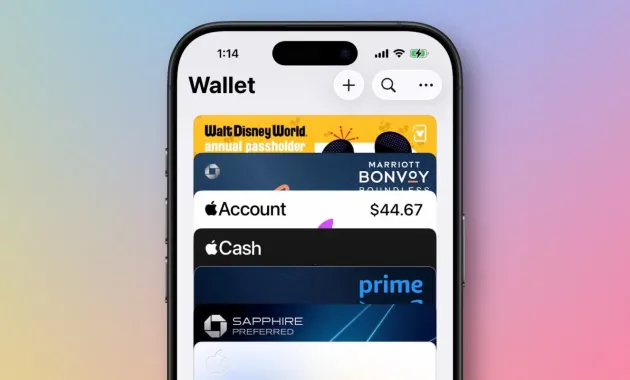
The card’s visual interface in the Wallet app provides real‑time spending breakdowns, making it easy to monitor Apple‑specific categories and adjust habits accordingly.
2. Chase Sapphire Preferred® – For Travel‑Savvy Apple Pay Users
While not Apple‑specific, the Chase Sapphire Preferred® card shines for users who frequently use Apple Pay for travel‑related expenses. Highlights include:
- Earn rates: 2X points on travel and dining (including restaurant purchases made through Apple Pay), 1X on all other purchases.
- Travel perks: Points transfer to airline and hotel partners, primary rental car insurance, and a $50 annual travel credit after spending $4,000.
- Apple Pay bonus: Occasionally, Chase runs limited‑time promotions offering extra points for Apple Pay transactions, which can be tracked via the Chase mobile app.
Travelers who book flights on Apple’s platforms or use Apple Pay for rideshares can capture accelerated points while enjoying the card’s broader travel benefits.
3. Citi® Double Cash Card – Simple Cash Back with Apple Pay
The Citi Double Cash card is a straightforward, no‑annual‑fee option that rewards every purchase, whether made through Apple Pay or a physical swipe. Its structure is:
- 1% cash back when you buy.
- 1% cash back when you pay the balance.
Because Apple Pay transactions count as purchases, users can effortlessly accrue cash back on daily spending, from coffee runs to online subscriptions. The card also integrates well with Citi’s online tools for tracking rewards, making it a solid choice for those who prefer simplicity over category‑specific bonuses.
4. American Express® Gold Card – Maximizing Food & Grocery Spend
For Apple Pay users who love dining out and grocery shopping, the Amex Gold Card delivers high‑value rewards:
- 4X Membership Rewards® points at U.S. supermarkets (up to $25,000 per year) when paying with Apple Pay.
- 4X points at restaurants worldwide, including delivery services accessed via Apple Pay.
- Annual dining credit of $120 (split into $10 monthly credits) that can be applied to eligible Apple Pay food purchases.
The card’s point‑valued flexibility—redeemable for travel, statement credits, or merchandise—offers versatile redemption paths that complement the Apple ecosystem.
5. Discover it® Cash Back – Rotating Categories Aligned with Apple Pay
Discover’s rotating‑category cash‑back card can be especially rewarding when Apple Pay promotions align with its quarterly themes. Current categories (as of 2026) include:
- 5% cash back on select streaming services (Apple Music, Apple TV+ qualifies when purchased through Apple Pay).
- 5% on grocery stores, pharmacies, and select online retailers when paying via Apple Pay.
- Unlimited 1% cash back on all other purchases.
Discover matches the first‑year cash‑back amount, effectively doubling your earnings—a feature that can be amplified by consistently using Apple Pay for eligible purchases.
How to Optimize Your Apple Pay Experience with the Right Card
Set Up Automatic Reward Tracking
Most card issuers provide mobile dashboards that categorize Apple Pay spend. Enabling push notifications for large transactions and weekly summaries helps you stay aware of bonus categories and prevents missed opportunities.
Leverage Apple Pay‑Only Promotions
Periodically, issuers run “Apple Pay‑only” offers—extra points or cash back when you pay with the digital wallet. To stay informed, subscribe to your card’s email alerts or check the “Offers” section in the Wallet app. For example, a recent guide on unlocking the full potential of your Premier Bank credit card login outlines steps to activate such promotions directly from the app.
Combine Card Benefits with Apple Card Monthly Installments
If you purchase Apple hardware (iPhone, iPad, Mac) and use Apple Pay with a compatible credit card, you can often split the cost into interest‑free monthly installments. Pairing this with a cash‑back or points‑earning card maximizes both the installment incentive and the reward accumulation.
Monitor Security Settings Regularly
Apple Pay’s tokenization is robust, but you should still review card‑specific security features. Set up two‑factor authentication, enable transaction alerts, and consider placing temporary spend limits while traveling. An article on understanding the payment landscape provides a deeper dive into how digital wallets interact with traditional fraud detection systems.
Choosing the Right Card for Your Lifestyle

When evaluating a credit card for Apple Pay, ask yourself the following:
- Spending patterns: Do you spend more on travel, groceries, or Apple services? Choose a card that rewards your primary categories.
- Fee tolerance: Premium cards often carry annual fees but deliver higher rewards. Determine if the benefits outweigh the cost.
- Redemption preferences: Cash back, travel points, or statement credits—pick a card whose redemption method aligns with your financial goals.
- Future flexibility: Consider whether the card supports additional digital wallets (Google Pay, Samsung Pay) in case you switch devices later.
By matching these criteria with the cards highlighted above, you can create a payment ecosystem that feels both intuitive and financially rewarding.
Practical Steps to Get Started
1. Review Your Current Card Portfolio
If you already hold a credit card, verify its Apple Pay compatibility. Most major issuers support the wallet, but some older cards may require re‑issuance. Logging into your online banking portal and navigating to the “Digital Wallet” section will confirm eligibility.
2. Apply for a Card That Complements Your Apple Pay Use
When applying, ensure the card’s reward structure aligns with your upcoming expenses. For instance, if you plan to purchase a new MacBook within the next six months, the Apple Card’s 3% back on Apple purchases may be the most advantageous.
3. Add the Card to Apple Wallet
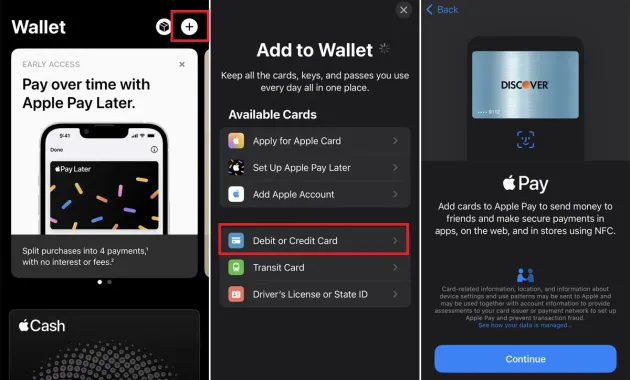
Open the Wallet app, tap the “+” sign, and follow the prompts to scan your card or enter details manually. After verification, you’ll see the card appear with its logo and a unique token ready for use.
4. Activate and Track Bonus Offers
Many issuers require you to opt‑in to specific Apple Pay promotions. This can usually be done through the card’s mobile app under “Rewards” or “Offers.” Keep an eye on expiration dates to avoid missing out.
5. Monitor Your Statements for Accuracy
After each billing cycle, review your statement to confirm that Apple Pay purchases are correctly categorized and that bonuses have been applied. Discrepancies can often be resolved quickly by contacting the issuer’s support line.
Potential Pitfalls and How to Avoid Them

Overlooking Tiered Reward Structures
Some cards, like the Chase Sapphire Preferred®, offer higher earnings on specific categories. If you use Apple Pay for a mix of travel and everyday purchases, ensure you’re not unintentionally missing out on higher‑tier points by defaulting to a generic cash‑back card.
Ignoring Annual Fees
Premium cards with superior Apple Pay bonuses often carry annual fees ranging from $95 to $550. Conduct a simple cost‑benefit analysis: multiply the expected annual rewards by the card’s redemption value and compare that to the fee. If the net gain is minimal, a no‑fee alternative like the Citi Double Cash may be more suitable.
Missing Out on Introductory Bonuses
Many cards feature sign‑up bonuses contingent on meeting a spending threshold within the first three months. Using Apple Pay for these qualifying purchases can help you hit the target faster, especially when buying large Apple items or paying for travel through the wallet.
Failing to Secure the Device
Even though Apple Pay uses tokenization, a compromised device can still expose your transaction history. Keep iOS updated, enable Face ID or Touch ID, and set a strong device passcode.
Future Outlook: Apple Pay and Credit Card Innovation
As mobile payments continue to dominate, issuers are expected to develop more Apple Pay‑centric features. Anticipated trends include:
- Dynamic rewards: Real‑time point multipliers that trigger based on location, time of day, or merchant partnership with Apple.
- Enhanced biometric verification: Integration of Face ID data to further reduce fraud risk, potentially lowering interest rates for low‑risk users.
- Seamless cross‑border benefits: Cards that automatically waive foreign transaction fees for Apple Pay purchases abroad, paired with localized currency conversion rates.
Staying informed about these developments can help you upgrade to newer cards that capitalize on Apple Pay’s evolving capabilities.
In summary, selecting the best credit card for Apple Pay involves aligning the card’s reward architecture with your spending habits, ensuring robust security, and taking advantage of exclusive Apple Pay promotions. Whether you gravitate toward the native Apple Card for its 3% Apple‑specific cash back, the travel‑focused Chase Sapphire Preferred® for its versatile points, or the straightforward Citi Double Cash for universal earnings, each option offers a distinct pathway to maximizing value. By following the practical steps outlined, monitoring for pitfalls, and staying attuned to future innovations, you can craft a payment strategy that leverages Apple Pay’s convenience while enhancing your financial rewards.