Table of Contents
- Why Choose Paperless Statements?
- Environmental Impact
- Immediate Access
- Enhanced Security
- Cost Savings
- Step‑by‑Step Guide to Enrolling
- 1. Log Into Your Online Account
- 2. Locate the “Statement Preferences” Section
- 3. Select “Electronic Only” or “Paperless” Option
- 4. Verify Your Contact Information
- 5. Save Changes and Confirm
- 6. Test the Setup
- Best Practices for Managing Digital Statements
- Organize with Folders
- Back Up Regularly
- Enable Alerts
- Review Statements Promptly
- Potential Challenges and How to Overcome Them
- Technical Glitches
- Limited Internet Access
- Data Security Concerns
- Compliance with Tax Requirements
- Integrating Paperless Statements with Other Financial Tools
- Automated Expense Categorization
- Linking to Mobile Wallets
- Credit Monitoring Services
- Future Outlook: The Evolution of Paperless Banking
Signing up for credit card paperless statements is quickly becoming a standard practice for consumers who want to streamline their finances. By opting for electronic delivery, you eliminate the hassle of sorting through piles of mail while gaining faster access to your transaction history. This shift not only supports environmental sustainability but also enhances security by reducing the risk of lost or stolen statements.
In today’s digital age, the convenience of viewing statements on a smartphone or computer is matched by the peace of mind that comes from knowing your sensitive information is stored securely online. As more banks and credit card issuers push for paperless communication, understanding the enrollment process, benefits, and potential pitfalls becomes essential for every cardholder.
Why Choose Paperless Statements?
Before diving into the mechanics of enrollment, it helps to examine the core reasons why paperless statements are gaining traction. The advantages extend beyond simple convenience and touch on several practical aspects of modern financial management.
Environmental Impact
Every paper statement saved translates to fewer trees cut, less ink used, and a lower carbon footprint associated with printing, mailing, and disposal. Over a year, a single cardholder can prevent dozens of sheets from entering landfills, contributing to a greener financial ecosystem.
Immediate Access
Electronic statements are typically available within 24–48 hours after the billing cycle closes. This rapid availability allows you to review charges, detect unauthorized activity, and reconcile accounts sooner than waiting for postal delivery.
Enhanced Security
Physical statements can be intercepted or misplaced, exposing personal data to identity thieves. Online portals often employ multi-factor authentication, encryption, and activity logs, offering a higher level of protection for your financial information.
Cost Savings
Many issuers waive monthly statement fees for paperless users. While the savings may seem modest on a per‑statement basis, they accumulate over time, especially for customers holding multiple cards.
Step‑by‑Step Guide to Enrolling
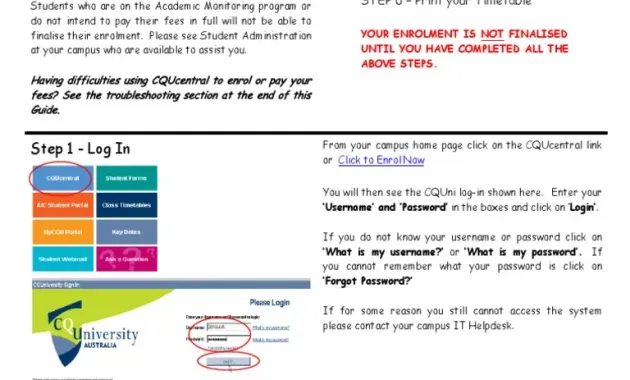
Enrolling in paperless statements varies slightly across issuers, but the general workflow follows a common pattern. Below is a universal checklist that can be adapted to most credit card platforms.
1. Log Into Your Online Account
Begin by accessing your credit card’s online portal or mobile app. If you have not yet set up online access, you will need to create a username and password, often verified through a one‑time code sent to your registered phone or email.
2. Locate the “Statement Preferences” Section
Within the account dashboard, look for a menu labeled “Statements,” “Preferences,” or “Communications.” This area houses options for delivery methods, frequency, and language.
3. Select “Electronic Only” or “Paperless” Option
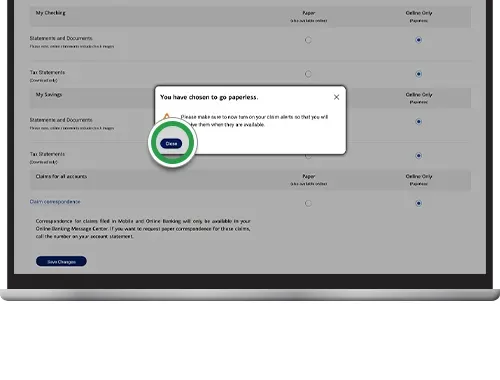
Choose the setting that indicates you wish to receive statements electronically. Some platforms may ask you to confirm the decision with a password or security question.
4. Verify Your Contact Information
Ensure that the email address linked to your account is current and that you have a reliable internet connection to receive notifications. Updating this information now prevents future gaps in access.
5. Save Changes and Confirm
After making your selections, click “Save,” “Submit,” or a similar button. Most issuers will display a confirmation screen or send a brief email confirming that paperless statements are now active.
6. Test the Setup
To confirm everything works as expected, wait for the next billing cycle and check your online portal for the new statement. If you encounter any issues, contact customer service for assistance.
Best Practices for Managing Digital Statements
Switching to paperless statements is only part of the journey. Proper management of your electronic documents ensures you continue to reap the benefits without compromising organization or security.
Organize with Folders
- Create a dedicated “Credit Card Statements” folder on your computer or cloud storage.
- Within that folder, set up subfolders by year and month for easy retrieval.
- Label each file consistently, e.g., “BankName_2024_03_Statement.pdf.”
Back Up Regularly
Use a reputable cloud service or external hard drive to back up your statements. This safeguards against accidental deletion or hardware failure.
Enable Alerts
Most issuers offer notification options—email, SMS, or push alerts—when a new statement is posted. Enabling these alerts ensures you never miss a billing cycle.
Review Statements Promptly
Set a recurring reminder—perhaps the day after your statement is posted—to review charges, verify payments, and flag any discrepancies. Early detection can prevent fraud and reduce the time needed for dispute resolution.
Potential Challenges and How to Overcome Them

While the transition to paperless statements is largely positive, a few challenges may arise. Being aware of these issues helps you address them before they become obstacles.
Technical Glitches
If the online portal experiences downtime, you might be unable to view your statement when needed. In such cases, contact customer support and ask for a temporary PDF copy sent via secure email.
Limited Internet Access
For individuals without reliable internet, paperless statements could pose a barrier. Consider using public libraries, community centers, or mobile data plans to access statements securely.
Data Security Concerns
Even though electronic delivery is generally more secure, phishing attempts remain a risk. Always log in directly through the issuer’s official website or app rather than clicking links in unsolicited emails.
Compliance with Tax Requirements
Some users need physical copies for tax filings or audits. In those situations, you can download and print the required statements from your online portal, preserving the digital record for future reference.
Integrating Paperless Statements with Other Financial Tools
Paperless statements do more than just replace paper; they can become a cornerstone of a broader digital finance strategy. By linking your statements to budgeting apps, expense trackers, or personal finance dashboards, you gain a holistic view of your financial health.
Automated Expense Categorization
Many budgeting platforms allow you to import PDF statements directly. Once uploaded, the software parses transactions and categorizes them—saving you hours of manual entry.
Linking to Mobile Wallets
Having electronic statements accessible on the same device where you manage your cards, such as Apple Pay, creates a seamless ecosystem. For insights on why digital wallet compatibility matters, read Why Apple Pay Compatibility Matters for Credit Card Choice.
Credit Monitoring Services
Some services can pull statement data to monitor credit utilization, helping you maintain a healthy credit score. If you ever need to close a card without harming your score, refer to the guide on How to Close a Credit Card Account and Keep Your Credit Score Intact for best practices.
Future Outlook: The Evolution of Paperless Banking
The move toward paperless statements is part of a larger trend of digitization in banking. Emerging technologies such as blockchain, AI‑driven fraud detection, and real‑time payment networks promise even more streamlined experiences. As issuers invest in secure APIs and open banking standards, customers can expect faster data exchange, richer analytics, and personalized financial advice—all delivered through the same digital channels that host their statements.
In the near future, paperless statements may evolve into interactive documents, allowing you to click on a transaction and instantly view merchant details, initiate a dispute, or set a recurring payment. The foundation laid today by opting into electronic delivery positions you to take full advantage of these innovations without the burden of outdated paper processes.
Adopting paperless statements is more than a simple preference; it is a strategic decision that aligns with modern financial habits, environmental responsibility, and enhanced security. By following the steps outlined above, maintaining disciplined record‑keeping practices, and integrating your statements with complementary digital tools, you can transform the way you manage credit card activity. The result is a cleaner inbox, a greener planet, and a clearer picture of your financial standing—ready for whatever opportunities the future holds.