Table of Contents
- Common Technical and Account‑Related Reasons
- Insufficient Available Credit
- Expired Card or Mismatched Card Details
- Daily or Monthly Transaction Limits
- Pending or Overdue Payments
- Security and Fraud Prevention Measures
- Fraud Detection Algorithms
- Card Not Present (CNP) Risks
- Frozen or Locked Card
- Merchant and Processor Issues
- Merchant Category Code (MCC) Restrictions
- Technical Glitches at the Point of Sale
- Incorrect Merchant Settings
- How to Diagnose the Decline Quickly
- Proactive Steps to Prevent Future Declines
- Maintain a Buffer of Available Credit
- Set Up Real‑Time Alerts
- Regularly Update Card Information with Recurring Merchants
- Use Card Management Features
- Monitor Merchant Category Restrictions
- When Declines Affect Recurring Payments
- What to Do If You Suspect Fraud
- Final Thoughts
Having a credit card declined at the checkout can feel like a sudden roadblock. The moment the terminal flashes “declined,” a ripple of frustration spreads across the table. The keyword “credit card declined” often triggers anxiety because it suggests a problem that could affect your finances, reputation, or even security. Understanding why a card is refused is the first step toward preventing the inconvenience from happening again.
In many cases, the decline is not a sign of a severe problem. It may simply be a temporary glitch, an overlooked balance, or a security measure that the issuing bank has activated. However, some declines point to deeper issues such as fraud alerts, outdated card information, or miscommunication between the merchant and the processor. By examining each possible cause, you can quickly diagnose the situation, take corrective action, and get back to spending with confidence.
This article walks through the most frequent triggers for a credit card decline, provides clear troubleshooting steps, and offers proactive tips to keep your card in good standing. Whether you’re dealing with a declined online purchase, a point‑of‑sale transaction, or an automated recurring payment, the guidance below will help you resolve the issue efficiently.
Common Technical and Account‑Related Reasons
Insufficient Available Credit
One of the simplest explanations for a decline is that the purchase amount exceeds the available credit limit. Even if you have sufficient overall credit, pending authorizations can temporarily reduce the amount you can spend. Check your recent transactions and any pending holds to confirm that the balance is indeed the problem.
Expired Card or Mismatched Card Details
Cards have an expiration date printed on the front. If the date has passed, the issuer will automatically reject any transaction. Additionally, entering the wrong expiration month, year, or CVV code—especially during online purchases—will trigger a decline. Always verify the details before confirming the payment.
Daily or Monthly Transaction Limits
Some issuers set limits on the total amount you can spend in a single day or month. These limits are often in place for security reasons, particularly for new accounts or cards with limited credit history. If you exceed the limit, the processor will decline the transaction until the limit resets.
Pending or Overdue Payments
If you missed a payment or your account is past due, the issuer may place a temporary hold on your card. This hold can prevent new purchases until the overdue balance is settled. Review your account statements and payment history to see if an overdue balance is the culprit.
Security and Fraud Prevention Measures
Fraud Detection Algorithms
Modern banks employ sophisticated algorithms that monitor transaction patterns. If a purchase appears unusual—such as a high‑value transaction in a foreign country or multiple rapid purchases—the system may flag it as potentially fraudulent and decline the card. In such cases, the issuer typically contacts you to verify the transaction.
Card Not Present (CNP) Risks
Online and phone purchases are considered “card not present” transactions, which carry higher fraud risk. If the merchant’s address or zip code does not match the cardholder’s billing information, the transaction may be declined. Ensuring that the billing address you provide matches the one on file with your issuer can reduce this risk.
Frozen or Locked Card
Some cardholders intentionally freeze their cards to prevent unauthorized use. A frozen card will be declined for any purchase until it is unfrozen. For a detailed look at why freezing a card makes sense, see our article on why freezing a credit card makes sense.
Merchant and Processor Issues

Merchant Category Code (MCC) Restrictions
Credit card issuers may restrict certain merchant categories, such as gambling, adult entertainment, or cryptocurrency exchanges. If you attempt to purchase from a restricted MCC, the transaction can be declined even though your account is in good standing.
Technical Glitches at the Point of Sale
Sometimes the problem lies with the merchant’s payment terminal or the payment gateway. A misconfiguration, outdated software, or a temporary loss of connectivity can cause a decline that has nothing to do with your card. In such cases, asking the merchant to retry the transaction on a different terminal often resolves the issue.
Incorrect Merchant Settings
Merchants must configure their payment processors correctly, including setting the correct currency and ensuring the card type is supported. If the merchant’s system is set to reject a particular card brand (e.g., Visa vs. Mastercard), the transaction will be declined.
How to Diagnose the Decline Quickly
- Check the error code. Many terminals display a short code (e.g., “05” for insufficient funds). Look up the code online or contact your issuer for clarification.
- Review recent activity. Log into your online banking portal or mobile app to see if a recent purchase or hold explains the decline.
- Verify card details. Ensure the expiration date, CVV, and billing address are entered correctly for online purchases.
- Contact the issuer. A quick call to the customer service number on the back of your card can reveal whether a fraud alert or account restriction caused the decline.
- Ask the merchant. The merchant can often provide a more detailed reason, especially if the decline is due to a technical issue on their end.
Proactive Steps to Prevent Future Declines

Maintain a Buffer of Available Credit
Keep a small buffer of unused credit to accommodate pending authorizations and daily spending spikes. This practice reduces the chance that a legitimate purchase will hit the credit limit unexpectedly.
Set Up Real‑Time Alerts
Many banks allow you to receive instant notifications for purchases, low balances, or fraud alerts. Enabling these alerts gives you immediate insight into potential issues before they cause a decline.
Regularly Update Card Information with Recurring Merchants
When a card expires or you receive a new number, remember to update the details for any recurring subscriptions, such as streaming services or utility bills. Failing to do so can lead to declined payments and service interruptions. For a guide on handling rewards accounts and related deposits, see understanding direct deposit for cash‑back rewards.
Use Card Management Features
Many issuers provide tools to lock or unlock cards, set spending limits, or designate travel notifications. Leveraging these features helps you stay in control and reduces the likelihood of unexpected declines.
Monitor Merchant Category Restrictions
If you frequently shop at merchants that fall into restricted categories, consider applying for a card that does not enforce those limits. Some premium cards, like the Wells Fargo Autograph Card, offer broader acceptance and fewer MCC restrictions.
When Declines Affect Recurring Payments
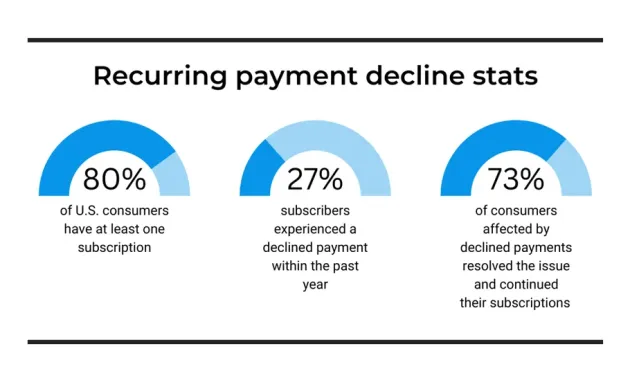
Recurring payments—such as gym memberships, subscription services, or automatic bill pay—are particularly vulnerable to declines because the merchant does not see the card in person. If a recurring payment fails, you may incur late fees or lose access to the service. To mitigate this risk:
- Set up a backup payment method, like a secondary credit card or a bank account, with the merchant.
- Periodically confirm that the card on file is still active and has not expired.
- Keep an eye on your email for alerts about declined recurring charges; many issuers send these automatically.
What to Do If You Suspect Fraud
If you suspect that the decline is due to fraud—perhaps because you received a call from your bank asking to verify a transaction—take immediate action. Freeze the card, review all recent activity, and file a fraud claim with your issuer. Most banks will issue a replacement card quickly and investigate the suspicious activity. Prompt reporting helps protect your credit score and prevents further unauthorized charges.
In some cases, a card may be declined because the issuer has identified a pattern that matches known fraudulent behavior. While inconvenient, this protective measure safeguards your financial identity. Once you confirm the legitimacy of the transaction, the issuer can lift the block.
By staying vigilant and responding quickly, you can minimize the impact of a decline caused by potential fraud.
Final Thoughts

Credit card declines are rarely random; they result from a combination of account status, security protocols, merchant settings, or simple data entry errors. The key to resolving a decline quickly is systematic diagnosis: check error codes, verify card details, review your account balance, and contact the issuer if needed. Proactive habits—such as maintaining a credit buffer, setting up alerts, and keeping card information up to date—can significantly reduce the frequency of declines.
When a decline does occur, treat it as an opportunity to double‑check your financial health, confirm that your security measures are working, and ensure that your merchants have the correct information. By following the steps outlined above, you’ll be better equipped to handle any unexpected “declined” message, keep your purchasing experience smooth, and maintain confidence in your credit card’s reliability.