Table of Contents
- Getting Started: Registering for Citi Online Access
- Gather Required Information
- Step‑by‑Step Registration Process
- Logging In: Secure Access Every Time
- Standard Login Procedure
- Tips for a Seamless Experience
- Exploring the Dashboard: Core Features and Tools
- Account Summary
- Payments and Transfers
- Rewards Management
- Security Settings
- Advanced Features: Getting More Value from Citi Online
- Credit Limit Increases
- Grace Period Optimization
- Bill Pay and Auto‑Pay Configuration
- Dispute Transactions Directly Online
- Troubleshooting Common Issues
- Unable to Log In
- Transaction Not Showing
- Security Alert Triggers
- Best Practices for Ongoing Management
- Regularly Review Statements
- Update Personal Information Promptly
- Leverage Alerts Wisely
- Take Advantage of Mobile Features
Accessing your Citi credit card online has become a routine part of modern financial life. From checking balances to setting up alerts, the convenience of a digital dashboard saves time and reduces the need for phone calls. This article walks you through the entire process, from initial registration to advanced features, ensuring you can navigate Citi’s online portal with confidence.
Whether you are a first‑time cardholder or someone looking to upgrade how you interact with your account, understanding the online platform is essential. By the end of this guide, you will know how to log in securely, customize your preferences, and leverage tools that help you stay on top of spending, payments, and rewards.
Getting Started: Registering for Citi Online Access
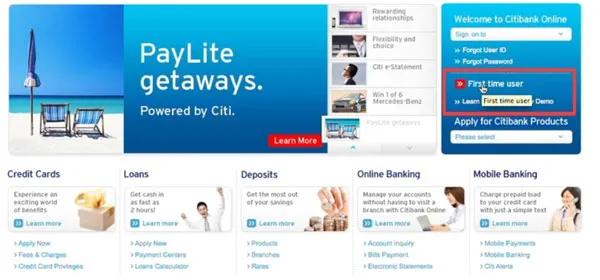
The first step toward managing your Citi credit card online is creating an account on Citi.com or the Citi Mobile app. Registration is straightforward, but a few details can smooth the experience.
Gather Required Information
- Your 16‑digit credit card number.
- The Social Security Number (or Tax Identification Number) linked to the account.
- A valid email address that you check regularly.
- Personal details such as date of birth and billing address for identity verification.
Step‑by‑Step Registration Process
- Visit the Citi Online Login page and click “Enroll Now.”
- Enter your credit card number and the 4‑digit security code printed on the back of the card.
- Provide the requested personal information and create a unique user ID and password. Citi recommends using a mix of letters, numbers, and symbols.
- Set up security questions that only you can answer. These will be used for future password recovery.
- Confirm your email address by clicking the verification link sent to your inbox.
Once registration is complete, you can log in immediately. For added security, consider enabling two‑factor authentication (2FA), which Citi offers via text message or an authenticator app.
Logging In: Secure Access Every Time
With your account created, logging in is a simple process. However, maintaining security should remain a priority.
Standard Login Procedure
- Navigate to the login portal and enter your user ID.
- Type your password exactly as created, respecting case sensitivity.
- If you have enabled 2FA, enter the code sent to your phone or generated by your authenticator app.
Tips for a Seamless Experience
- Bookmark the login page on a secure browser to avoid phishing sites.
- Clear browser cache regularly if you share a device with others.
- Never save your password in public or shared computers.
For users who have forgotten their password, Citi’s “Forgot Password” link guides you through a verification process using your email or security questions. This feature is essential for uninterrupted access.
Exploring the Dashboard: Core Features and Tools
After logging in, the dashboard presents a snapshot of your account activity. Understanding each section helps you make informed financial decisions.
Account Summary
The top of the dashboard displays your current balance, available credit, and recent transactions. You can click on any transaction to view details, merchant information, and the date of purchase.
Payments and Transfers
From the “Payments” tab, you can schedule a one‑time payment, set up automatic recurring payments, or transfer balances to another Citi account. The platform also supports “Pay Over the Phone” for users who prefer a hybrid approach.
Rewards Management
If your Citi card includes a rewards program, the “Rewards” section tracks points earned, redemption options, and upcoming promotions. Keeping an eye on this area can help you maximize benefits without missing expiration dates.
Security Settings
Security is a recurring theme throughout the portal. Under “Profile & Settings,” you can:
- Update your password and security questions.
- Enable or disable two‑factor authentication.
- Review recent login activity and flag any suspicious attempts.
- Set up alerts for transactions exceeding a specific amount, foreign purchases, or when your balance reaches a chosen threshold.
These controls are essential for protecting your financial information, especially if you frequently access the site from multiple devices.
Advanced Features: Getting More Value from Citi Online
Beyond basic account management, Citi’s online platform offers several advanced tools that can enhance your financial health.
Credit Limit Increases
Applying for a credit limit increase can be done entirely online. Citi evaluates your request based on payment history, credit utilization, and overall credit profile. For a detailed look at the benefits of a higher limit, see our guide on why consider an online credit limit increase?
Grace Period Optimization
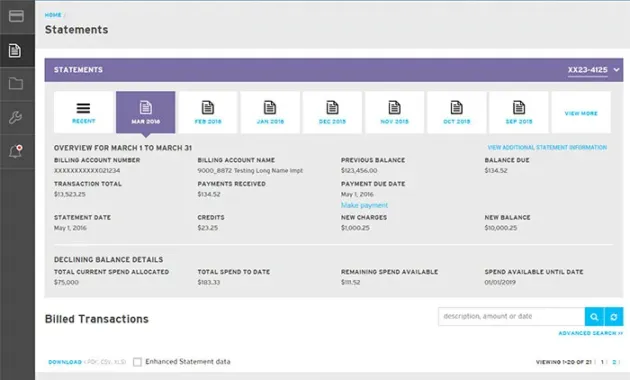
Understanding and leveraging the grace period can help you avoid interest charges. Citi’s portal displays your statement date, payment due date, and the number of days in the grace period. For strategies on keeping interest at bay, read the article on the hidden power of your credit card grace period.
Bill Pay and Auto‑Pay Configuration
Setting up auto‑pay ensures you never miss a payment, which protects your credit score and saves on late fees. You can choose to pay the full balance, the minimum amount, or a custom amount each month. Auto‑pay can also be toggled on or off at any time through the “Payments” section.
Dispute Transactions Directly Online
If you notice an unfamiliar charge, Citi’s “Dispute a Transaction” feature allows you to submit a claim without calling customer service. Upload any supporting documents, describe the issue, and track the status of your dispute from the same dashboard.
Troubleshooting Common Issues
Even with a robust platform, users occasionally encounter problems. Below are solutions to the most frequent obstacles.
Unable to Log In
- Double‑check that you are on the official Citi website.
- Verify that Caps Lock is off and that you are using the correct user ID.
- If you have recently changed your password, ensure you are using the updated version.
- Clear browser cookies or try a different browser.
- Use the “Forgot Password” link to reset credentials after verifying your identity.
Transaction Not Showing
Transactions may take up to 24‑48 hours to post. If a purchase is still missing after this period, contact the merchant first, then reach out to Citi’s support through the secure messaging center within the portal.
Security Alert Triggers
When Citi flags an unusual login attempt, you will receive an email or SMS alert. Follow the instructions to confirm whether the activity was authorized. If you suspect fraud, lock your card immediately via the “Lock/Unlock Card” feature and request a replacement.
Best Practices for Ongoing Management
Consistently applying a few best practices can keep your Citi credit card experience smooth and secure.
Regularly Review Statements
Even though you can monitor transactions in real time, reviewing the monthly statement helps catch any missed or duplicated charges.
Update Personal Information Promptly
Changes to your address, phone number, or email should be reflected in the portal as soon as possible. This ensures you receive important alerts and that your card remains linked to your current contact details.
Leverage Alerts Wisely
Set up alerts for low balances, high‑value purchases, and upcoming payment due dates. Alerts act as a safety net, especially if you use multiple cards or have a busy schedule.
Take Advantage of Mobile Features
The Citi Mobile app mirrors the website’s functionality, offering push notifications, fingerprint login, and the ability to lock or unlock your card with a single tap. Keeping the app updated guarantees you benefit from the latest security patches.
By following these guidelines, you maintain control over your finances while enjoying the flexibility that digital banking provides.
In summary, accessing your Citi credit card online is a multi‑step journey that starts with a simple registration, progresses through secure login, and expands into a suite of tools for payment, rewards, and security management. The platform’s intuitive design, combined with proactive security measures, makes it a reliable hub for everyday financial tasks. Whether you are tracking spending, applying for a credit limit increase, or disputing a transaction, the online portal equips you with the resources needed to manage your account efficiently and safely.