Table of Contents
- Getting Started with the Sears Credit Card Online Account
- Creating Your Account
- Verifying Identity
- Setting Up Security
- Key Features of the Online Portal
- Balance Inquiry and Credit Limit Overview
- Payment Options
- Transaction History
- Rewards Management
- Paperless Statements
- Managing Your Account Securely
- Password Best Practices
- Two‑Factor Authentication (2FA)
- Device Management
- Common Issues and Troubleshooting
- Forgotten Password
- Declined Transactions
- Updating Personal Information
- Tips to Maximize Benefits
- Automatic Payments and Avoiding Late Fees
- Reward Redemption Strategies
- Credit Monitoring and Reporting
- Utilizing Promotional Offers
- Secure Document Storage
Sears credit card online services have become a central hub for cardholders who want quick access to their account information. From checking balances to making payments, the platform offers a range of tools that simplify everyday financial tasks. Understanding how to use these services efficiently can save time, reduce fees, and help users stay on top of their credit health.
In this article we follow a typical cardholder’s journey, beginning with the first login and ending with advanced strategies for maximizing rewards. The narrative is built on real‑world actions—creating an account, setting up security, handling common glitches—so readers can picture each step as it unfolds. By the end, you will have a clear roadmap for navigating the Sears credit card portal without unnecessary confusion.
Whether you are a longtime Sears shopper or a new applicant, the online portal is designed to be intuitive. Yet many users overlook features that could improve their experience, such as automated payment options or the ability to download statements securely. The sections below explore every major function, offering practical advice that aligns with best practices across the credit‑card industry.
Getting Started with the Sears Credit Card Online Account
Creating Your Account
The first interaction begins on the official Sears credit card website. After locating the “Sign In / Register” button, users are prompted to enter personal details, including name, Social Security number, and the 16‑digit card number. This information matches the data stored in Sears’ backend systems, ensuring that the new account belongs to the right individual.
Verifying Identity
To protect against fraud, the system may request additional verification. Common methods include answering security questions, receiving a one‑time passcode via SMS, or confirming a recent transaction. Successful verification unlocks full access to the dashboard.
Setting Up Security
Once inside, the next priority is establishing a strong password. A recommended format combines uppercase letters, lowercase letters, numbers, and special characters (e.g., Se@r5$2026!). Enabling two‑factor authentication (2FA) adds an extra layer of protection, requiring a second code each time you log in from a new device.
Key Features of the Online Portal
Balance Inquiry and Credit Limit Overview
The homepage displays a concise snapshot of your current balance, available credit, and upcoming payment due date. This real‑time view helps you avoid accidental over‑limit charges and plan your budgeting strategy.
Payment Options
Multiple payment channels are integrated into the portal:
- Bank‑account transfers via ACH.
- Credit‑card payments using another Visa or Mastercard.
- Electronic checks (e‑checks) for those who prefer direct debit.
- One‑time payments through third‑party services such as PayPal, where supported.
Setting up an automatic payment schedule is straightforward—simply select “Auto‑Pay,” choose the amount (minimum, full, or custom), and confirm the funding source. This feature ensures you never miss a due date, protecting your credit score.
Transaction History
Every purchase, payment, and adjustment appears in a searchable ledger. Users can filter by date range, merchant name, or transaction type. Exporting this data to CSV or PDF formats is possible, which aligns with best practices for personal finance tracking.
Rewards Management
Sears credit cardholders earn points on eligible purchases. The portal’s “Rewards” tab shows accumulated points, tier status, and available redemption options such as merchandise vouchers or statement credits. Regularly monitoring this section helps you capitalize on earned benefits before they expire.
Paperless Statements
Opting for electronic statements reduces clutter and accelerates access to detailed billing information. To download a statement securely, navigate to the “Statements” area and click the desired month. The file is encrypted and can be saved locally or opened directly in a PDF viewer. For a deeper look at secure download practices, see How to Download Credit Card Statements Quickly and Securely – Your Complete Guide.
Managing Your Account Securely
Password Best Practices
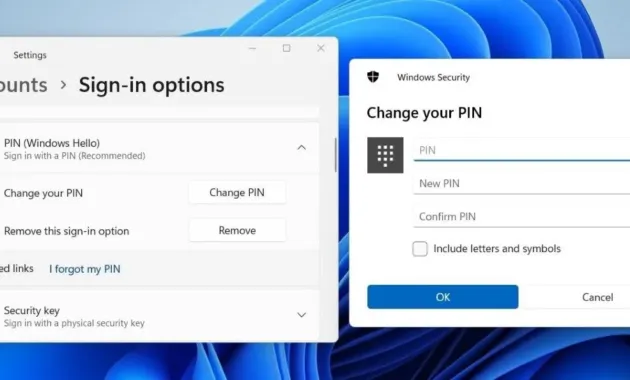
Beyond the initial password creation, periodic updates are essential. Change your password at least every six months and avoid reusing credentials from other financial sites. If you suspect a breach, reset immediately.
Two‑Factor Authentication (2FA)
When 2FA is enabled, the portal sends a unique code to your registered mobile number or email address each time you log in from an unfamiliar device. This step dramatically reduces the risk of unauthorized access, especially on public Wi‑Fi networks.
Device Management
The “Device Activity” page lists all recent logins, including location, IP address, and device type. If you notice unfamiliar entries, you can terminate those sessions and force a password reset. Regularly reviewing this log helps maintain a clean security posture.
Common Issues and Troubleshooting
Forgotten Password
Click the “Forgot Password?” link on the sign‑in page. After entering your registered email, you’ll receive a password‑reset link that expires within 15 minutes. Follow the instructions to set a new password that meets the complexity requirements.
Declined Transactions
Transactions may be declined for several reasons: insufficient credit, an expired card, or a temporary hold placed by the merchant. The portal’s “Alerts” section often provides the specific cause. If the issue persists, contacting Sears Customer Service through the secure messaging feature can resolve the problem quickly.
Updating Personal Information
Changing your mailing address, phone number, or email address is done in the “Profile” tab. After submitting updates, the system may request a verification document (e.g., a utility bill) to confirm the new information.
Tips to Maximize Benefits

Automatic Payments and Avoiding Late Fees
Scheduling auto‑pay for at least the minimum amount guarantees on‑time payments. For those who wish to avoid interest altogether, set the auto‑pay amount to “Full Balance.” This habit protects your credit utilization ratio and improves your credit score over time.
Reward Redemption Strategies
Instead of letting points sit idle, consider redeeming them for statement credits when you have an upcoming large purchase. This approach translates rewards into immediate savings, similar to the tactics discussed in Unlock the Benefits of Navy Federal Credit Union Credit Cards – Your Complete Guide, where strategic redemption maximizes value.
Credit Monitoring and Reporting
The online portal offers a free credit score preview updated monthly. Reviewing this score helps you gauge the impact of your payment behavior. Additionally, setting up alerts for significant balance changes can prevent surprise over‑limit fees.
Utilizing Promotional Offers
From time to time Sears rolls out limited‑time promotions, such as bonus points for purchases in specific categories (e.g., home appliances). Enabling push notifications ensures you receive these offers promptly, allowing you to plan purchases around them.
Secure Document Storage
Download and store important documents—monthly statements, payment confirmations, and reward redemption receipts—in an encrypted folder on your device. Having a local backup can be helpful during disputes or for tax‑related record keeping.
By following the steps outlined above, cardholders can transform the Sears credit card online portal from a basic utility into a comprehensive financial management tool. The process begins with a simple registration, progresses through secure navigation of features, and culminates in proactive strategies that preserve credit health and extract maximum value from rewards. Consistent use of these practices leads to fewer errors, lower fees, and a clearer picture of one’s overall financial standing.